第二课 张量(Tensor)的设计

一个张量类主要由以下3部分组成:

  1. 数据本身,可以为double,int,float等等。
  2. 张量的维度形状shape
  3. 张量类的类方法,如返回张量的宽度、高度、填充数据和张量变形等等。

张量类的设计

本项目选择在arma::fcube(三维矩阵)基础上进行开发。

对于一个Tensor类,我们的工作主要为以下两个:

  1. 提供对外接口,在arma::fcube基础上进行提供。
  2. 封装矩阵相关的计算功能。
1
2
3
4
5
6
7
8
9
10
11
12
13
14
15
template <>
class Tensor<float> {
public:
uint32_t rows() const;
uint32_t cols() const;
uint32_t channels() const;
uint32_t size() const;
void set_data(const arma::fcube& data);
...
...
...
private:
std::vector<uint32_t> raw_shapes_; // 张量数据的实际尺寸大小
arma::fcube data_; // 张量数据
};

数据的摆放顺序

两种形式:行主序和列主序。

Tensor方法概述

创建张量

首先,在所有事情开始前,我们需要创建一个张量。在创建张量——这一多维矩阵的过程中,自然而然想到我们需要用一个raw_shapes变量来存储张量的维度,而不同维度将决定了arma::fcube的具体结构。我们需要根据输入的维度信息创建相应维度的arma::fcube,且创建一个用于存储维度的变量。

  • 如果张量是1维的,则raw_shapes的长度就等于1;
  • 如果张量是2维的,则raw_shapes的长度就等于2,以此类推;
  • 在创建3维张量时,则raw_shapes的长度为3;

==值得注意的是,如果当channelrows同时等于1时,raw_shapes的长度也会是1,表示此时Tensor是一维的;而当channel等于1时,raw_shapes的长度等于2,表示此时Tensor是二维的。==

创建1维张量

1
2
3
4
Tensor<float>::Tensor(uint32_t size) {
data_ = arma::fcube(1, size, 1); // 传入的参数依次是,rows cols channels
this->raw_shapes_ = std::vector<uint32_t>{size};
}

创建2维张量

1
2
3
4
Tensor<float>::Tensor(uint32_t rows, uint32_t cols) {
data_ = arma::fcube(rows, cols, 1); // 传入的参数依次是, rows cols channels
this->raw_shapes_ = std::vector<uint32_t>{rows, cols};
}

创建3维张量

1
2
3
4
5
6
7
8
9
10
11
12
13
Tensor<float>::Tensor(uint32_t channels, uint32_t rows, uint32_t cols) {
data_ = arma::fcube(rows, cols, channels);
if (channels == 1 && rows == 1) {
// 当channel和rows同时等于1时,raw_shapes的长度也会是1,表示此时Tensor是一维的
this->raw_shapes_ = std::vector<uint32_t>{cols};
} else if (channels == 1) {
// 当channel等于1时,raw_shapes的长度等于2,表示此时Tensor是二维的
this->raw_shapes_ = std::vector<uint32_t>{rows, cols};
} else {
// 在创建3维张量时,则raw_shapes的长度为3,表示此时Tensor是三维的
this->raw_shapes_ = std::vector<uint32_t>{channels, rows, cols};
}
}

返回张量的维度信息

1
2
3
4
5
6
7
8
9
10
11
12
13
14
15
16
17
18
19
int32_t Tensor<float>::rows() const {
CHECK(!this->data_.empty());
return this->data_.n_rows;
}

uint32_t Tensor<float>::cols() const {
CHECK(!this->data_.empty());
return this->data_.n_cols;
}

uint32_t Tensor<float>::channels() const {
CHECK(!this->data_.empty());
return this->data_.n_slices;
}

uint32_t Tensor<float>::size() const {
CHECK(!this->data_.empty());
return this->data_.size();
}

获取张量中的数据

1
2
3
4
const arma::fmat& Tensor<float>::slice(uint32_t channel) const {
CHECK_LT(channel, this->channels());
return this->data_.slice(channel);
}

以上方法用于返回fcube变量中的第channel个矩阵。换句话说,一个fcube作为数据的实际存储者,由多个矩阵叠加而成。当我们调用slice方法时,它会返回其中的第channel个矩阵。

1
2
3
4
5
6
float Tensor<float>::at(uint32_t channel, uint32_t row, uint32_t col) const {
CHECK_LT(row, this->rows());
CHECK_LT(col, this->cols());
CHECK_LT(channel, this->channels());
return this->data_.at(row, col, channel);
}

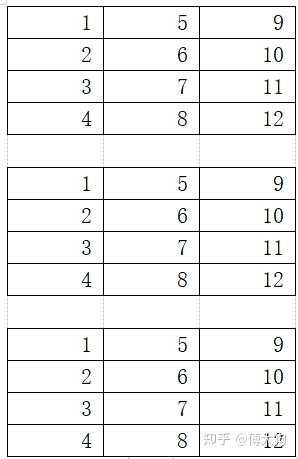
以上方法用于访问三维张量中第(channel, row, col)位置的对应数据。对于以下的Tensor,访问(1, 1, 1)位置的元素,会得到6。
img

张量的填充

1
2
3
4
5
6
7
8
9
10
11
12
13
14
15
16
17
18
19
20
void Tensor<float>::Fill(const std::vector<float>& values, bool row_major) {
CHECK(!this->data_.empty());
const uint32_t total_elems = this->data_.size();
CHECK_EQ(values.size(), total_elems);
if (row_major) {
const uint32_t rows = this->rows();
const uint32_t cols = this->cols();
const uint32_t planes = rows * cols;
const uint32_t channels = this->data_.n_slices;

for (uint32_t i = 0; i < channels; ++i) {
auto& channel_data = this->data_.slice(i);
const arma::fmat& channel_data_t =
arma::fmat(values.data() + i * planes, this->cols(), this->rows());
channel_data = channel_data_t.t();
}
} else {
std::copy(values.begin(), values.end(), this->data_.memptr());
}
}

如果函数中的row_major参数为true,则表示按照行优先的顺序填充元素;如果该参数为false,则将按照列优先的顺序填充元素。

对张量中的元素依次处理

1
2
3
4
void Tensor<float>::Transform(const std::function<float(float)>& filter) {
CHECK(!this->data_.empty());
this->data_.transform(filter);
}

Transform方法依次将张量中每个元素进行处理,处理的公式如下: $x=transform(x)$

对张量进行变形

1
2
3
4
5
6
7
8
9
10
11
12
13
14
15
16
17
18
19
20
21
22
23
24
25
26
27
28
29
void Tensor<float>::Reshape(const std::vector<uint32_t>& shapes,
bool row_major) {
CHECK(!this->data_.empty());
CHECK(!shapes.empty());
const uint32_t origin_size = this->size();
const uint32_t current_size =
std::accumulate(shapes.begin(), shapes.end(), 1, std::multiplies());
CHECK(shapes.size() <= 3);
CHECK(current_size == origin_size);

std::vector<float> values;
if (row_major) {
values = this->values(true);
}
if (shapes.size() == 3) {
this->data_.reshape(403 Forbidden(1), shapes.at(2), shapes.at(0));
this->raw_shapes_ = {shapes.at(0), shapes.at(1), 403 Forbidden(2)};
} else if (shapes.size() == 2) {
this->data_.reshape(shapes.at(0), 403 Forbidden(1), 1);
this->raw_shapes_ = {shapes.at(0), shapes.at(1)};
} else {
this->data_.reshape(1, shapes.at(0), 1);
this->raw_shapes_ = {shapes.at(0)};
}

if (row_major) {
this->Fill(values, true);
}
}

这是一个复合程度更高的函数,用到了我们在之前构建好的方法。如果我们想对张量的维度进行调整,我们自然需要获取前后的形状,比如张量原先的大小是(channel1, row1, col1), 再进行reshape之后我们将张量的大小调整为(channel2, row2, col2)。此外,我们还需要对内部的 data_ 的维度也进行调整,用于存放之后的数据;最后只需要将准备好的数据进行填充即可。

需要注意的是,在调整的过程中,前后的两组维度要满足以下的关系:

$(channel1\times row1 \times col1)=(channel2 \times row2 \times col2)$

张量类的辅助函数

判断张量符合是否为空

1
bool Tensor<float>::empty() const { return this->data_.empty(); }

返回张量数据存储区域的起始地址

1
2
3
4
const float* Tensor<float>::raw_ptr() const {
CHECK(!this->data_.empty());
return this->data_.memptr();
}

上文说到,张量类中数据存储由三维矩阵类(fcube)负责,所以在raw_ptr的目的就是返回数据存储的起始位置。

返回张量的shape

1
2
3
4
5
6
const std::vector<uint32_t>& Tensor<float>::raw_shapes() const {
CHECK(!this->raw_shapes_.empty());
CHECK_LE(this->raw_shapes_.size(), 3);
CHECK_GE(this->raw_shapes_.size(), 1);
return this->raw_shapes_;
}

返回张量的三维形状[channels, rows, cols].

  • 如果 channels = 1 并且 rows = 1,则 raw_shapes 返回一维形状 [cols],张量是一个一维张量。
  • 如果 channels = 1,则 raw_shapes 返回二维形状 [rows, cols],张量是一个二维张量。
  • 否则表明该Tensor就是一个三维张量,raw_shapes 返回三维形状 [channels, rows, cols].

练习

Flatten

编写Tensor::Flatten方法,将多维展开成一维。

在这里插入图片描述

观察函数声明和单元测试

1
2
3
4
5
6
7
8
9
10
11
12
13
14
15
16
17
18
19
void Tensor<float>::Flatten(bool row_major) {
CHECK(!this->data_.empty());
// 请补充代码
}
TEST(test_homework, homework1_flatten1) {
using namespace kuiper_infer;
Tensor<float> f1(2, 3, 4);
f1.Flatten(true);
ASSERT_EQ(f1.raw_shapes().size(), 1);
ASSERT_EQ(f1.raw_shapes().at(0), 24);
}

TEST(test_homework, homework1_flatten2) {
using namespace kuiper_infer;
Tensor<float> f1(12, 24);
f1.Flatten(true);
ASSERT_EQ(f1.raw_shapes().size(), 1);
ASSERT_EQ(f1.raw_shapes().at(0), 24 * 12);

方法实现,调用Reshape即可

1
2
3
4
5
6
7
void Tensor<float>::Flatten(bool row_major) {
CHECK(!this->data_.empty());
// 请补充代码
std::vector<uint32_t> new_shapes = std::vector<uint32_t>{ this->size() };
this->Reshape(new_shapes, row_major);
}

Padding

编写Tensor::Padding函数,在张量周围做填充

在这里插入图片描述

观察函数声明和单元测试

1
2
3
4
5
6
7
8
9
10
11
12
13
14
15
16
17
18
19
20
21
22
23
24
25
26
27
28
29
30
31
32
33
34
35
36
37
38
39
40
41
42
43
44
45
46
47
48
49
50
51
52
53
54
55
56
57
58
59
60
61
62
63
64
65
66
67
68
69
70
71
72
73
74
/**
* 填充张量
* @param pads 填充张量的尺寸
* @param padding_value 填充张量
*/
void Tensor<float>::Padding(const std::vector<uint32_t>& pads,
float padding_value) {
CHECK(!this->data_.empty());
CHECK_EQ(pads.size(), 4);
// 四周填充的维度
uint32_t pad_rows1 = pads.at(0); // up
uint32_t pad_rows2 = pads.at(1); // bottom
uint32_t pad_cols1 = pads.at(2); // left
uint32_t pad_cols2 = pads.at(3); // right

// 请补充代码

}
TEST(test_homework, homework2_padding1) {
using namespace kuiper_infer;
Tensor<float> tensor(3, 4, 5);
ASSERT_EQ(tensor.channels(), 3);
ASSERT_EQ(tensor.rows(), 4);
ASSERT_EQ(tensor.cols(), 5);

tensor.Fill(1.f);
tensor.Padding({1, 2, 3, 4}, 0);
ASSERT_EQ(tensor.rows(), 7);
ASSERT_EQ(tensor.cols(), 12);

int index = 0;
for (int c = 0; c < tensor.channels(); ++c) {
for (int r = 0; r < tensor.rows(); ++r) {
for (int c_ = 0; c_ < tensor.cols(); ++c_) {
if ((r >= 2 && r <= 4) && (c_ >= 3 && c_ <= 7)) {
ASSERT_EQ(tensor.at(c, r, c_), 1.f) << c << " "
<< " " << r << " " << c_;
}
index += 1;
}
}
}
}

TEST(test_homework, homework2_padding2) {
using namespace kuiper_infer;
ftensor tensor(3, 4, 5);
ASSERT_EQ(tensor.channels(), 3);
ASSERT_EQ(tensor.rows(), 4);
ASSERT_EQ(tensor.cols(), 5);

tensor.Fill(1.f);
tensor.Padding({2, 2, 2, 2}, 3.14f);
ASSERT_EQ(tensor.rows(), 8);
ASSERT_EQ(tensor.cols(), 9);

int index = 0;
for (int c = 0; c < tensor.channels(); ++c) {
for (int r = 0; r < tensor.rows(); ++r) {
for (int c_ = 0; c_ < tensor.cols(); ++c_) {
if (c_ <= 1 || r <= 1) {
ASSERT_EQ(tensor.at(c, r, c_), 3.14f);
} else if (c >= tensor.cols() - 1 || r >= tensor.rows() - 1) {
ASSERT_EQ(tensor.at(c, r, c_), 3.14f);
}
if ((r >= 2 && r <= 5) && (c_ >= 2 && c_ <= 6)) {
ASSERT_EQ(tensor.at(c, r, c_), 1.f);
}
index += 1;
}
}
}
}

思路是先把保存原始数据,接着把data_变成对应填充后的shape,之后创建全新数组pad_values并全部填充上padding_value,然后把pad_values对应位置填上原始数据,最后调用Fill方法将pad_values填充入data_

1
2
3
4
5
6
7
8
9
10
11
12
13
14
15
16
17
18
19
20
21
22
23
24
25
26
27
28
29
30
31
32
33
34
35
36
37
38
39
40
41
42
void Tensor<float>::Padding(const std::vector<uint32_t>& pads,
float padding_value) {
CHECK(!this->data_.empty());
CHECK_EQ(pads.size(), 4);
// 四周填充的维度
uint32_t pad_rows1 = pads.at(0); // up
uint32_t pad_rows2 = pads.at(1); // bottom
uint32_t pad_cols1 = pads.at(2); // left
uint32_t pad_cols2 = pads.at(3); // right

// 请补充代码
// params needed
uint32_t ori_rows = this->rows();
uint32_t ori_cols = this->cols();
uint32_t new_rows = this->rows() + pad_rows1 + pad_rows2;
uint32_t new_cols = this->cols() + pad_cols1 + pad_cols2;
uint32_t channels = this->channels();
const std::vector<float>& ori_values = this->values();

// new data members
this->data_ = arma::fcube(new_rows, new_cols, channels);
this->raw_shapes_ = std::vector<uint32_t>{ channels, new_rows, new_cols };

// fill pad values, row_major
CHECK_EQ(this->size(), new_rows * new_cols * channels);
std::vector<float> pad_values = std::vector<float>(this->size());
std::fill(pad_values.begin(), pad_values.end(), padding_value);

uint32_t ori_channelsize = ori_rows * ori_cols;
uint32_t pad_channelsize = new_cols * new_rows;
for (uint32_t channel = 0; channel < channels; ++channel) {
for (uint32_t row = 0; row < ori_rows; ++row) {
uint32_t pad_row = row + pad_rows1;
std::copy(ori_values.begin() + channel * ori_channelsize + row * ori_cols,
ori_values.begin() + channel * ori_channelsize + (row + 1) * ori_cols,
pad_values.begin() + channel * pad_channelsize + pad_row * new_cols + pad_cols1);
}
}
CHECK_EQ(this->size(), pad_values.size());
this->Fill(pad_values);
}