第三课 计算图的设计

计算图的概念

KuiperInfer使用的模型格式是PNNX。作为一种计算图格式,PNNX包含以下几个部分:

  1. Operator:深度学习计算图中的计算节点。包括以下几个部分:
    1. 存储输入与输出张量。
    2. 计算节点的类型与名称
    3. 参数信息(卷积核的步长,大小)
    4. 权重信息(weight,bias)
  2. Graph:多个Operator串联成的有向无环图,规定各个Operato的执行流程与顺序。
  3. Layer:Operator中运行的具体执行者
  4. Tensor:用于存储==多维数据==的数据结构,方便数据在计算节点之间传递,同时该结构也封装矩阵乘、点积等与矩阵相关的基本操作。

PNNX的优势

  1. 使用模板匹配方法将匹配到的子图用对应的等价大算子替换。

  2. Pytorch中简单的算术表达式在转换为PNNX后,会保存表达式的整体结构,而不是拆分成许多小的加减乘除算子。

  3. PNNX项目中有大量图优化的技术,包括了算子融合,常量折叠和消除公共表达式等等。

    1. 算子融合优化是一种针对深度学习神经网络的优化策略,通过将多个相邻的计算算子合并为一个算子来减少计算量和内存占用。以卷积层和批归一化层为例,我们可以把两个算子合并为一个新的算子,也就是将卷积的公式带入到批归一化层的计算公式中:
      $$
      Conv=\omega* x_1+b\
      BN=\gamma\frac{x_2-\hat\mu}{\delta^2+\epsilon}+\beta\
      $$
      其中 $x_1$和 $x_2$依次是卷积和批归一化层的输入, $\omega$是卷积层的权重, b是卷积层的偏移量, $\hat\mu$和$\sigma$依次是样本的均值和方差, $\epsilon$为一个极小值。带入后有:
      $$
      Fused=\gamma\frac{(\omega* x+b)-\hat\mu}{\delta^2+\epsilon}+\beta\
      $$

    2. 常量折叠是将在编译时期间将表达式中的常量计算出来,然后将结果替换为一个等价的常量,以减少模型在运行时的计算量。

    3. 常量移除就是将计算图中不需要的常数(计算图推理的过程中未使用)节点删除,从而减少计算图的文件和加载后的资源占用大小。

    4. 公共表达式消除优化是一种针对计算图中重复计算的优化策略,它可以通过寻找并合并重复计算的计算节点,减少模型的计算量和内存占用。
      公共子表达式检测是指查找计算图中相同的子表达式,公共子表达式消除是指将这些重复计算的计算节点合并为一个新的计算节点,从而减少计算和内存开销。举个例子:
      X = input(3,224,224); A = Conv(X); B = Conv(X); C = A + B
      在上方的代码中,Conv(X)这个结果被计算了两次,公共子表达式消除可以将它优化为如下代码,这样一来就少了一次卷积的计算过程。
      X = input(3, 224, 224); T = Conv(X); C = T + T

综上所述,如果在我们推理框架的底层用PNNX计算图,就可以吸收图优化和算子融合的结果,使得推理速度更快更高效。

PNNX计算图的格式

PNNX由Graph、Operator和Operand三种结构组成,设计非常简洁。(可理解为流水线、工人和产品)

PNNX中的图结构(Graph)

1
2
3
4
5
6
7
8
9
10
11
12
class Graph
{
Operator* new_operator(const std::string& type, const std::string& name);
Operator* new_operator_before(const std::string& type, const std::string& name, const Operator* cur);

Operand* new_operand(const torch::jit::Value* v);
Operand* new_operand(const std::string& name);
Operand* get_operand(const std::string& name);

std::vector<Operator*> ops;
std::vector<Operand*> operands;
};

Graph的核心作用是管理计算图中的运算符和操作数。下面我们将对这两个概念进行说明:

  1. Operator类用来表示计算图中的运算符(算子),比如一个模型中的Convolution, Pooling等算子;
  2. Operand类用来表示计算图中的操作数,即与一个运算符有关的输入和输出张量
  3. Graph类的成员函数提供了方便的接口用来创建和访问操作符和操作数,以构建和遍历计算图。同时,它也是模型中运算符(算子)和操作数的集合

PNNX中的运算符结构(Operator)

有了上面的直观认识,我们来聊聊PNNX中的运算符结构。

1
2
3
4
5
6
7
8
9
10
11
12
13
class Operator
{
public:
std::vector<Operand*> inputs;
std::vector<Operand*> outputs;

std::string type;
std::string name;

std::vector<std::string> inputnames;
std::map<std::string, Parameter> params;
std::map<std::string, Attribute> attrs;
};

在PNNX中,Operator用来表示一个算子,它由以下几个部分组成:

  1. inputs:类型为std::vector<operand>, 表示这个算子在计算过程中所需要的输入操作数operand
  2. outputs:类型为std::vector<operand>, 表示这个算子在计算过程中得到的输出操作数operand
  3. typename类型均为std::string, 分别表示该运算符号的类型和名称
  4. params, 类型为std::map, 用于存放该运算符的所有参数(例如卷积运算符中的params中将存放stride, padding, kernel size等信息);
  5. attrs, 类型为std::map, 用于存放该运算符所需要的具体权重属性(例如卷积运算符中的attrs中就存放着卷积的权重和偏移量,通常是一个float32数组)。

PNNX中的Attribute和Param结构

在PNNX中,权重数据结构(Attribute)和参数数据结构(Param)定义如下。它们通常与一个运算符(Operator)相关联,例如Linear算子的in_features属性和weight权重。

1
2
3
4
5
6
7
8
9
10
11
12
13
14
15
16
17
18
19
20
21
22
class Parameter
{
// 0=null 1=b 2=i 3=f 4=s 5=ai 6=af 7=as 8=others
int type;
...
...
}
class Attribute
{
public:
Attribute()
: type(0)
{
}

Attribute(const std::initializer_list<int>& shape, const std::vector<float>& t);

// 0=null 1=f32 2=f64 3=f16 4=i32 5=i64 6=i16 7=i8 8=u8 9=bool
int type;
std::vector<int> shape;
...
};

PNNX中的操作数结构(Operand)

1
2
3
4
5
6
7
8
9
10
11
12
13
class Operand
{
public:
void remove_consumer(const Operator* c);
Operator* producer;
std::vector<Operator*> consumers;

int type;
std::vector<int> shape;

std::string name;
std::map<std::string, Parameter> params;
};

重点值得分析的是操作数结构中的producercustomers, 分别表示产生这个操作数的算子使用这个操作数的算子

值得注意的是==产生这个操作数的算子只能有一个,而使用这个操作数的算子可以有很多个==。

KuiperInfer对计算图的封装

为了更好的使用底层PNNX计算图,我们会在项目中对它进行再次封装,使得PNNX更符合我们的使用需求。

UML整体结构图
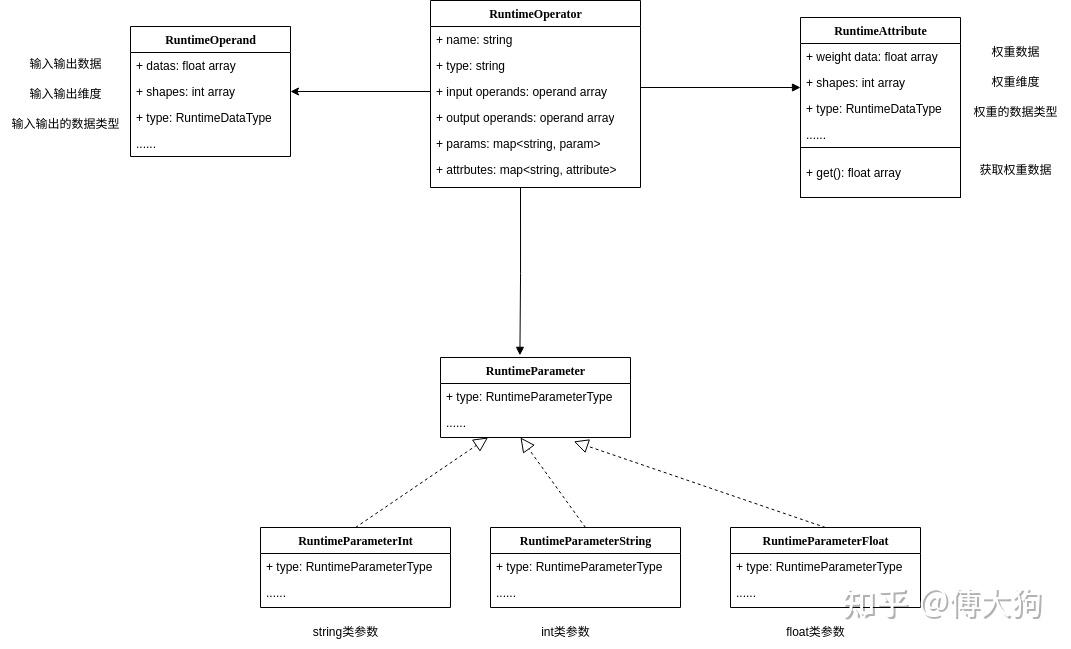
img

对Operator的封装

不难从上图看出,RuntimeOperatorKuiperInfer计算图中的核心数据结构,是对PNNX::Operator的再次封装,它有如下的定义:

1
2
3
4
5
6
7
8
9
10
11
12
13
14
15
16
17
18
19
20
21
22
struct RuntimeOperator {
virtual ~RuntimeOperator();

bool has_forward = false;
std::string name; /// 计算节点的名称
std::string type; /// 计算节点的类型
std::shared_ptr<Layer> layer; /// 节点对应的计算Layer

std::vector<std::string> output_names; /// 节点的输出节点名称
std::shared_ptr<RuntimeOperand> output_operands; /// 节点的输出操作数

std::map<std::string, std::shared_ptr<RuntimeOperand>>
input_operands; /// 节点的输入操作数
std::vector<std::shared_ptr<RuntimeOperand>>
input_operands_seq; /// 节点的输入操作数,顺序排列
std::map<std::string, std::shared_ptr<RuntimeOperator>>
output_operators; /// 输出节点的名字和节点对应

std::map<std::string, RuntimeParameter*> params; /// 算子的参数信息
std::map<std::string, std::shared_ptr<RuntimeAttribute>>
attribute; /// 算子的属性信息,内含权重信息
};

以上这段代码定义了一个名为RuntimeOperator的结构体。结构体包含以下成员变量:

  1. name: 运算符节点的名称,可以用来区分一个唯一节点,例如 Conv_1, Conv_2 等;

  2. type: 运算符节点的类型,例如 Convolution, Relu 等类型;

  3. layer: 负责完成具体计算的组件,例如在 Convolution Operator 中,layer 对输入进行卷积计算,即计算其相应的卷积值;

  4. input_operandsoutput_operands 分别表示该运算符的输入和输出操作数

    如果一个运算符(RuntimeOperator)的输入大小为 (4, 3, 224, 224),那么在 input_operands 变量中,datas 数组的长度为 4,数组中每个元素的张量大小为 (3, 224, 224)

  5. params 是运算符(RuntimeOperator)的参数信息,包括卷积层的卷积核大小、步长等信息;

  6. attribute 是运算符(RuntimeOperator)的权重、偏移量信息,例如 Matmul 层或 Convolution 层需要的权重数据

  7. 其他变量的含义可参考注释。

从Operator到Kuiper::RuntimeOperator

在这个过程中,需要先从 PNNX::Operator 中提取数据信息(包括我们上文提到的 OperandOperator 结构),并依次填入到 KuiperInfer 对应的数据结构中。

相应的代码如下所示,由于篇幅原因,在课件中省略了一部分内容,完整的代码可以在配套的 course3 文件夹中查看。

1
2
3
4
5
6
7
8
9
10
11
12
13
14
15
16
17
18
19
20
21
22
23
24
25
26
27
28
29
30
31
32
33
34
35
36
37
38
39
40
41
42
bool RuntimeGraph::Init() {
if (this->bin_path_.empty() || this->param_path_.empty()) {
LOG(ERROR) << "The bin path or param path is empty";
return false;
}

this->graph_ = std::make_unique<pnnx::Graph>();
int load_result = this->graph_->load(param_path_, bin_path_);
if (load_result != 0) {
LOG(ERROR) << "Can not find the param path or bin path: " << param_path_
<< " " << bin_path_;
return false;
}

std::vector<pnnx::Operator *> operators = this->graph_->ops;
for (const pnnx::Operator *op : operators) {
std::shared_ptr<RuntimeOperator> runtime_operator =
std::make_shared<RuntimeOperator>();
// 初始化算子的名称
runtime_operator->name = op->name;
runtime_operator->type = op->type;

// 初始化算子中的input
const std::vector<pnnx::Operand *> &inputs = op->inputs;
InitGraphOperatorsInput(inputs, runtime_operator);

// 记录输出operand中的名称
const std::vector<pnnx::Operand *> &outputs = op->outputs;
InitGraphOperatorsOutput(outputs, runtime_operator);

// 初始化算子中的attribute(权重)
const std::map<std::string, pnnx::Attribute> &attrs = op->attrs;
InitGraphAttrs(attrs, runtime_operator);

// 初始化算子中的parameter
const std::map<std::string, pnnx::Parameter> &params = op->params;
InitGraphParams(params, runtime_operator);
this->operators_.push_back(runtime_operator);
this->operators_maps_.insert({runtime_operator->name, runtime_operator});
}
return true;
}

和上文中的单元测试相同,需要先打开一个 PNNX 模型文件,并在返回错误时记录日志并退出。

1
2
3
4
5
6
7
this->graph_ = std::make_unique<pnnx::Graph>();
int load_result = this->graph_->load(param_path_, bin_path_);
if (load_result != 0) {
LOG(ERROR) << "Can not find the param path or bin path: " << param_path_
<< " " << bin_path_;
return false;
}

for循环中依次对每个运算符进行处理

1
for (const pnnx::Operator *op : operators)

提取PNNX运算符中的名字(name)和类型(type).

1
2
runtime_operator->name = op->name;
runtime_operator->type = op->type;

提取PNNX中的操作数Operand到RuntimeOperand

此处的过程对应于以上代码中的InitGraphOperatorsInputInitGraphOperatorsOutput函数。

1
2
3
4
5
6
7
8
9
10
11
12
13
14
15
16
17
18
19
20
21
22
23
24
25
26
27
28
29
30
31
32
33
34
35
36
37
38
for (const pnnx::Operator *op : operators){
inputs = op->inputs;
InitGraphOperatorsInput(inputs, runtime_operator);
...
void RuntimeGraph::InitGraphOperatorsInput(
const std::vector<pnnx::Operand *> &inputs,
const std::shared_ptr<RuntimeOperator> &runtime_operator) {

// 遍历所有的输入张量
for (const pnnx::Operand *input : inputs) {
if (!input) {
continue;
}
const pnnx::Operator *producer = input->producer;
std::shared_ptr<RuntimeOperand> runtime_operand =
std::make_shared<RuntimeOperand>();
// 搬运name和shape
runtime_operand->name = producer->name;
runtime_operand->shapes = input->shape;

switch (input->type) {
case 1: {
// 搬运类型
runtime_operand->type = RuntimeDataType::kTypeFloat32;
break;
}
case 0: {
runtime_operand->type = RuntimeDataType::kTypeUnknown;
break;
}
default: {
LOG(FATAL) << "Unknown input operand type: " << input->type;
}
}
runtime_operator->input_operands.insert({producer->name, runtime_operand});
runtime_operator->input_operands_seq.push_back(runtime_operand);
}
}

**这段代码的两个参数分别是来自 PNNX 中的一个运算符的所有输入操作数(Operand)和待初始化的 RuntimeOperator。**在以下的循环中:

1
for (const pnnx::Operand *input : inputs)

我们需要依次将每个 Operand 中的数据信息搬运到新初始化的 RuntimeOperand,包括 type, name, shapes 等信息,并记录输出这个操作数(Operand)的运算符(producer)。

搬运完成后,再将数据完备的 RuntimeOperand 插入到待初始化的 RuntimeOperator 中。


1
2
3
4
5
6
7
8
9
10
11
12
13
14
15
const std::vector<pnnx::Operand*>& outputs = op->outputs;
InitGraphOperatorsOutput(outputs, runtime_operator);
void RuntimeGraph::InitGraphOperatorsOutput(
const std::vector<pnnx::Operand *> &outputs,
const std::shared_ptr<RuntimeOperator> &runtime_operator) {
for (const pnnx::Operand *output : outputs) {
if (!output) {
continue;
}
const auto &consumers = output->consumers;
for (const auto &c : consumers) {
runtime_operator->output_names.push_back(c->name);
}
}
}

这段代码的两个参数分别是来自 PNNX 中的一个运算符的所有输出操作数Operand)和待初始化的 RuntimeOperator.

在这里,我们只需要记录操作数的消费者的名字(customer.name)即可。在之后的课程中,我们才会对 RuntimeOperator 中的输出操作数(RuntimeOperand)进行构建,到时再讲。

提取PNNX中的权重(Attribute)到RuntimeAttribute

1
2
3
4
5
6
7
8
9
10
11
12
13
14
15
16
17
18
19
20
21
22
const std::map<std::string, pnnx::Attribute>& attrs = op->attrs;
InitGraphAttrs(attrs, runtime_operator);
void RuntimeGraph::InitGraphAttrs(
const std::map<std::string, pnnx::Attribute>& attrs,
const std::shared_ptr<RuntimeOperator>& runtime_operator) {
for (const auto& [name, attr] : attrs) {
switch (attr.type) {
case 1: {
std::shared_ptr<RuntimeAttribute> runtime_attribute =
std::make_shared<RuntimeAttribute>();
runtime_attribute->type = RuntimeDataType::kTypeFloat32;
runtime_attribute->weight_data = attr.data;
runtime_attribute->shape = attr.shape;
runtime_operator->attribute.insert({name, runtime_attribute});
break;
}
default: {
LOG(FATAL) << "Unknown attribute type: " << attr.type;
}
}
}
}

这段代码的两个参数分别是来自 PNNX 中的一个运算符的所有权重数据结构(Attribute)和待初始化的RuntimeOperator. 在以下的循环中,

1
for (const auto& [name, attr] : attrs)

我们需要依次将 Attribute 中的数据信息搬运到新初始化的 RuntimeAttribute,包括 type, weight_data, shapes 等信息。搬运完成后,再将数据完备的 RuntimeAttribute 插入到待初始化的 RuntimeOperator 中,同时也记录这个权重的名字。

Linear层中这里的name就是weightbias, 对于前文测试模型中的Linear层,它的weight shape是(32, 128),weight_data就是$32\times 128$个float数据。